Saturday, 28 December 2013

Playing with Prolog

If you ask a number of computing science graduates (especially from the 90's) a few will have used the Prolog language at some point. Prolog is a logic language - think of it as defining a lot of facts and matching the fact with some data (like doing a database lookup). You run a "query" by matching your rules to your facts.

In my final year of my degree I worked on a project to create a "Graphical Interface for Prolog". The project represented (I think) 25% of the final score for the year and this project made me a developer. The idea for the project came from a poll of possible projects - I was told at the end that they thought the work that would be done in this project would be mainly theoretical. However, I ended up producing a "product" - in fact two products. (I also ended up winning the IBM prize that year for the best project).

We already had a Prolog interpreter for the classes we did in Artificial Intelligence - and the source code for it, which was written in C by Fernando Pereira whilst he was doing a PhD at Edinburgh University. I took his code and added some hooks into it to allow it to be extended. This gave a mechanism to add new methods working with the Prolog data types. I then wrote a set of graphical predicates (essentially functions that said whether they worked or not - can could pass back data).

For a few years I had been meaning to try and get this up and running again. I did have the source code - but on 5.25" floppy disks (which I can't read any more). But I did have the printouts.

I looked around on the internet for a Prolog interpreter and found Prolog.NET for which there was source code (written in C#). So, it being the holidays I decided on doing a bit of sofa coding - although after four or five hours, I do wish I had just sat at a desk with multiple monitors and to save all the papers thrown about the floor!

So, here are a few instructions if you want to do your own extensions. The main piece of code to add to is Library.cs which has a list of predicates and functions. I added the following code.
standard.Add("graphics", 1, new PredicateDelegate(Graphics.graphics), false);
standard.Add("axes", 2, new PredicateDelegate(Graphics.axes2), false);
standard.Add("grset", 2, new PredicateDelegate(Graphics.grset), false);
standard.Add("point", 1, new PredicateDelegate(Graphics.point), false);
standard.Add("line", 2, new PredicateDelegate(Graphics.line), false);
standard.Add("rectangle", 2, new PredicateDelegate(Graphics.rectangle), false);
standard.Add("wait", 1, new PredicateDelegate(Graphics.wait), false);
These predicates that I am defining (graphics, axes, grset, point, line, rectangle) are the same ones I did twenty years ago - just need to do an implementation. My implementation will be with Windows Forms - but without events. This makes it difficult to get mouse button presses, so I have another predicate (wait) which will wait for a period of time.

Other examples of code already written is in the folder LibraryMethods. I added a file Graphics.cs and changed the namespace and the class definition as below
namespace Prolog
{
    internal static class Graphics
    {
       // Your code
    }
}
I initially started "hacking" the code trying to keep track of an implementation of a Windows Form instance within my Graphics class. But stopped. The class was now doing more than one thing - dealing with the Prolog predicates as well as working out the Windows Forms. And was getting confusing.

Looking at my old project in C I had a set of methods called s1wg - Simple One Window Graphics. The implementation behind this was with X-Windows. Guess what - I decided to use the same "interface" - although now within a class. It was actually good to see that the implementation I did all these years ago (before getting real experience) was essentially implementing the S of SOLID (Single Responsibility Principle). I could write this code separately (in another project) and check it was working without worrying about the Prolog part (and that was giving me some problems as well). So s1wg is a simple class with methods to
  • Constructor
  • Close down (close the window)
  • Create a window (with specified position, size and title)
  • Draw a point
  • Draw a line (between two positions)
  • Draw a rectangle (with a position, width and height)
I then went back to work with the Prolog parts. The predicates we have are
  • graphics - with a parameter to initialise or close (e.g. graphics(initialise) or graphics(close)).
  • axes - to define a virtual axes (e.g. axes([-1,-8],[8,2])).
  • grset - to set something (e.g. grset(size,[400,400]) sets the window size in pixels)
  • point - to draw a point using virtual co-ordinates (e.g. point([3,3])).
  • line - to draw a line between virtual co-ordinates (e.g. line([2,5],[5,6])).
  • rectangle - to draw a rectangle a particular position with specified width and height (e.g. rectangle([1,3],[5,6])).
  • wait - taking a parameter for a delay in milliseconds (e.g. wait(100)).
I'll get the code put up somewhere in case anyone wants to try this. Here is however an example of some of the code
public static bool line(WamMachine machine, WamReferenceTarget[] arguments)
{
    Debug.Assert(arguments.Length == 2);

    WamCompoundTerm lowerLeft = arguments[0].Dereference() as WamCompoundTerm;
    WamCompoundTerm upperRight = arguments[1].Dereference() as WamCompoundTerm;

    if (lowerLeft == null || upperRight == null)
        return false;

    if (lowerLeft.Functor == Functor.ListFunctor && 
        upperRight.Functor == Functor.ListFunctor)
    {
        if (lowerLeft.Children.Length != 2 || upperRight.Children.Length != 2)
            return false;

        double? llX = GetDouble(lowerLeft.Children[0]);
        WamCompoundTerm t = lowerLeft.Children[1].Dereference() as WamCompoundTerm;
        double? llY = GetDouble(t.Children[0]);

        double? urX = GetDouble(upperRight.Children[0]);
        t = upperRight.Children[1].Dereference() as WamCompoundTerm;
        double? urY = GetDouble(t.Children[0]);

        if (llX == null || llY == null || urX == null || urY == null)
            return false;

        s1wg.DrawLine(ScaleX((double)llX), ScaleY((double)llY), 
                      ScaleX((double)urX), ScaleY((double)urY));
    }
    return true;
}
This piece of code is checking for two parameters - which are Prolog lists, e.g. line([3,4],[7,8]). From this you need to extract the values (as WamCompoundTerm) and then check that we have lists - then the lists both have two entries. I wrote a method to extract a double from each element. I had major problems with doubles, so ended up writing this bit of code
private static double? GetDouble(WamReferenceTarget argument)
{
    WamValueDouble operandDouble = argument.Dereference() as WamValueDouble;
    Double d = 0.0d;

    if (operandDouble == null)
    {
        WamValueInteger operandInteger = argument.Dereference() as WamValueInteger;
        if (operandInteger == null)
        {
            WamValueString operandString = argument.Dereference() as WamValueString;
            if (operandString != null)
            {
                if (Double.TryParse(operandString.Value, out d))
                {
                    return d;
                }
                else 
                    return null;
            }
            else
                return null;
        }
        else
            return (double)operandInteger.Value;
    }
    else
        return operandDouble.Value;
}
Ok - definitely needs cleaning up. I check if I can get a double (which I cannot ever get working), then check if we have an integer - if it isn't an integer I check for a string that can be converted into a double. Note I am using the nullable double functionality. I am pretty sure I told my apprentices that if you start using structures like this it is probably a "code smell" of a bad design!

There are some other methods (ScaleX and ScaleY) that translate between the virtual a real co-ordinates.

What was the point of this graphical interface. It allowed you to see problems solved graphically. My first one isn't really a logic problem, but shows the use of look-ups. This exercise is "chain encoded images" - for a chain of numbers I draw lines in the direction depending on each number.

Firstly, lets have some "facts"
vector(["0"],[1,0]).
vector(["1"],[1,1]).
vector(["2"],[0,-1]).
vector(["3"],[-1,1]).
vector(["4"],[-1,0]).
vector(["5"],[-1,-1]).
vector(["6"],[0,1]).
vector(["7"],[1,-1]).
These are a list of vectors - if I specify "1" I will move 1 unit on the X axis and 1 unit on the Y axis. So if you execute the command
:-vector(["0"],C).
You will get output that C is [1,0]. Next I will have a predicate newposition which will calculate a new position
newposition([X1,Y1],[DX,DY],[X2,Y2]) :-
    (X2 is (X1 + DX)),
    (Y2 is (Y1 + DY)).
Running the following command
:-newposition([3,4],[1,2],NewPosition).
Then you will get the NewPosition as [4,6]. Hooking this up to vector you can use this like
:-vector(["2"],Delta),
newposition([4,2],Delta,NewPosition).
will give the output
Delta = [0,-1]
NewPosition = [4,1]
One of my main issues with this implementation was getting lists working. Lists in Prolog are managed a the first element in the list - and the remaining items. The code to draw the chain consists of two predicates. Prolog can/is a very recursive language. The first version we have of this predicate does the main work
drawchain([H|T],S,P) :-
    vector([H],D),
    newposition(P,D,N),
    line(P,N),
    wait(100),
    drawchain(T,S,N).
Here the drawchain predicate takes a list as the first parameter[H|T] where H is the head of the list (the first element) and T is the tail (the remaining elements). The remaining parameters are S (for start position) and P (for current position). Take each line in turn
  • vector([H],D) uses the head element to get the value D (the delta/change from position)
  • newposition(P,D,N) calculates the new position N using the current position P and delta D
  • line(P,N) draws a line between P and N
  • wait(100) will wait 100 millseconds
  • drawchain(T,S,N) will call the drawchain predicate with parameters S (the start position) and N (the new position we just calculated) with T being the tail of the list.
The next predicate is the stop condition - when the list is empty. In this case we want the predicate to draw a line from the current position to the start position (the "parameters" P and S respectively).
drawchain([],S,P) :-
    line(P,S).
Now to execute this I have the predicate below
chains :-
  Chain is ["0","1","6","3","4","5","2"],
  axes([-5,-2],[11,6]),
  graphics(initialise),
  drawchain(Chain,[0,0],[0,0]).
Which is executed with
:-chains.
And you get this.

Chain Encoded Images


It's been really quite fun to play with this. Not sure if I have wasted a day of my time, but interesting to see the work I did a few years ago in operation. I have other examples to get up and running with this (Towers of Hanoi, Binary Trees and Travelling Salesman) which I implemented with this interface. As well as completing the graphics predicates (text, filled shapes etc.)

The good news is that I did in less than a day work that I did over a three month period in 1990 (albeit with a little bit of an idea now of what I am doing).

Friday, 6 December 2013

First view of parallel programming in C#

I have my current apprentice group sitting an assessment in software testing yesterday. Whilst they were doing this I thought I would investigate parallel computing in C#/.Net.

This is something I was very heavily involved with from about 1997 to 2000. At the time I was working in Schlumberger with MPP (massively parallel computers) – mainly IBM SP/2 (now IBM e-series), Silicon Graphics Origin Servers and Sun SparcStations. In the office (in 1999) we had a sixteen processor IBM SP/2 – but I also worked closely with IBM, SGI and Sun to visit them and use servers with up to 500 processors, including several weeks spent at IBM in Poughkeepsie in upstate New York and Cray Park (SGI’s HQ at the time) in Minnesota.

What I was looking at was something I could do on my own laptop, which has an Intel i5 with 4 cores. Could I get a speed-up and how easy would it be to implement. Previously I used libraries like MPI (Message Passing Interface) and PVM (Parallel Virtual Machine) to provide a common approach for all the platforms that we supported.

I looked for some reference material (see http://www.microsoft.com/en-gb/download/details.aspx?id=19222) which I could work through, but needed some examples to see it in operation. This gives an examples – however, I would strongly recommend read this to understand what some of the issues might be.

I you are reading this looking for asynchronous programming in another thread (i.e. doing some work/calculation whilst loading a page) then this is the wrong article. This will be about solving a problem – and I’ll start with a simple one, but eventually maybe use it for some mathematical puzzle.

The problem that I will look to solve will be to perform the addition of an array of numbers to get a sum. I’ll work with an array of 500,000,000 shorts – and these are initialised via a loop with the current number of milliseconds. I just needed some values in the array. Something more “real” or even “random” would be better, but I just need some numbers.

The code to do this will be

private static short[] numbers = new short[500000000];

static void InitialiseTask()
{
    for (int i = 0; i < numbers.Length; i++)
    {
        numbers[i] = (short) DateTime.Now.Millisecond;
    }
}

To perform the sum of this array the sequential code would be

static void SequentialTask()
{
    Console.WriteLine("Starting Sequential Task");
    long sum = 0;
    for (int i = 0; i < numbers.Length; i++)
    {
        sum += numbers[i];
    }
    Console.WriteLine("Sum {0}", sum);
}

I am going to package these up with a method to record start and end times

static void Task(Action task)
{
    DateTime startTime;
    Console.WriteLine("Starting {0}", task.Method);
    startTime = DateTime.Now;

    // Run the task
    task.Invoke();
    Console.WriteLine("{0}", task.Method);
    Console.WriteLine("-- START {0:hh:mm:ss.fff} FINISH {1:hh:mm:ss.fff} MS {2}",
        startTime, 
        DateTime.Now, DateTime.Now.Subtract(startTime).TotalMilliseconds);
}

So that my main program would be

static void Main(string[] args)
{
    Task(InitialiseTask);
    Task(SequentialTask);
}

And running this gave this result


So let’s turn the sequential task into a parallel task. We will split this up into two summations – the first one will sum the first 250,000,000 values and the second one the last 250,000,000 values. We will then add these two sum together to get the final sum.

We have method below which takes as parameter a task number – which will determine which part of the array we will count. The return is a long – not an int or short which will be too small.

static long ParallelSum(int taskNumber)
{
    Console.WriteLine("Starting Parallel Task {0}", taskNumber);
    long sum = 0;
    int start, end;
    if (taskNumber == 0)
    {
        start = 0;
        end = numbers.Length / 2;
    }
    else
    {
        start = numbers.Length / 2;
        end = numbers.Length;
    }

    for (int i = start; i < end; i++)
    {
        sum += numbers[i];
    }
    Console.WriteLine("Sum for task {0} is {1}", taskNumber, sum);
    return sum;
}

I know I have explicitly set the start/end points of the loop – rather than calculate them. Next for the .Net magic (I always tell my apprentices that there is no magic, but this is quite cool).

static void ParallelTask()
{
    Console.WriteLine("Starting Parallel Tasks");

    long[] sums = new long[2];
    Parallel.For(0, 2, task =>
        {
            sums[task] = ParallelSum(task);
        });

    long totalSum = 0;
    foreach (long sum in sums)
        totalSum += sum;

    Console.WriteLine("Total Sum {0}", totalSum);
}

We use the magic Parallel.For(inclusiveStart, exclusiveEnd, Action body). This will run each iteration – but in parallel. The body (delegate) is run once per iteration. So here the delegate ParallelSum will be run with arguments 0 and 1 (i.e. from and including inclusiveStart of 0 to exclusiveEnd of 2 – i.e. not 2).

I have created a local array variable to save the summations of each task and retrieved at the end of each task that summation. Once all the tasks have been completed a total sum is created. 

Modifying the main program to perform the parallel task as below

static void Main(string[] args)
{
    Task(SequentialInitialiseTask);
    Task(SequentialTask);
    Task(ParallelTask);
}

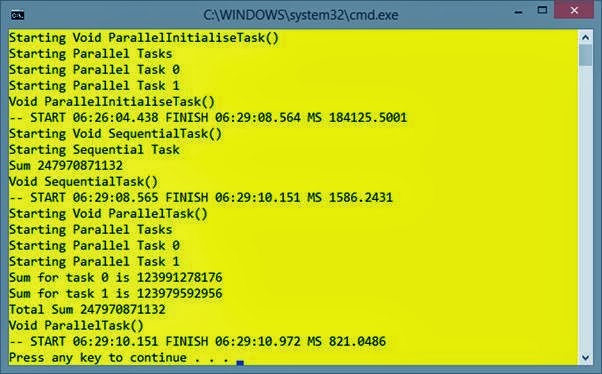
Giving output of


With the sequential task taking 1621 milliseconds and the parallel task 1296. In a further task (where I didn't do anything else on my laptop the results were 1588 ms against 844. Which is even more impressive. I am however concerned about the nearly six minutes to set the values in the array. So let’s make a parallel version of that. The main program will look at that

static void Main(string[] args)
{
    Task(ParallelInitialiseTask);
    Task(SequentialTask);
    Task(ParallelTask);
}

The task to initialise the array in parallel

static void ParallelInitialiseTask()
{
    Console.WriteLine("Starting Parallel Tasks");
    Parallel.For(0, 2, ParallelInitialise);
}

static void ParallelInitialise(int taskNumber)
{
    Console.WriteLine("Starting Parallel Task {0}", taskNumber);
    int start, end;
    if (taskNumber == 0)
    {
        start = 0;
        end = numbers.Length / 2;
    }
    else
    {
        start = numbers.Length / 2;
        end = numbers.Length;
    }

    for (int i = start; i < end; i++)
        numbers[i] = (short)DateTime.Now.Millisecond;
}

When you run this the results are


Showing a good speed up.

The splitting up of the problem (i.e. each task working with its own part of the array) is known as partitioning using domain decomposition. Here we have multiple tasks doing the same thing – each task handling a portion of the data. 

My processor has two cores and four logical processors – so the next step is to look at splitting the problem up more. I’d also like to look at the tools available to view the task running. Maybe more next time, if I get a few hours of fun!

Also need to investigate what thread safe really means, locking and a review of all the costs involved. The article mentioned earlier has a lot of detail – and hopefully I can get off the line with some simple examples. Although I need to dig out some other typical problems to solve.

Note: A server like a SP/2 was essentially multiple RS/6000 workstations networked together with a big fast networking switch – and a Silicon Graphics Origin has what could be described as a shared memory architecture, but each piece of memory will be associated with a processor – a processor accessing the memory local to that processor will get quicker access than to other memory. 

Thursday, 19 September 2013

SQL: User Defined Functions - Multi Statement Table Valued

Nearly finished this ad-hoc series of articles. This started as an exploration of CROSS APPLY and took me back to using user defined functions and how to use functions that return tables.

Our Scalar user defined function returned a single value, but we could have complex code. This is akin to a stored procedure, with the change that we could use the value returned within our SQL. The inline table valued function gave us the ability to return a results set that we could use within our FROM clauses. It was similar to a view (and could be used like a view, in that it could be updateable as well - depending on the SQL).

This type - multi statement table valued - of function creates a table variable which we then populate within our function and return it. We can put additional code within our function rather than a single SELECT statement. So now we can return a complex result set - and use this within our SQL. To be able to do this without functions, you would use a stored procedure and create a table variable (or a temporary table) and execute the stored procedure.

I always like a solution to solve, rather than showing some syntax. So I'd like a function that returns for a particular employee (in Northwind again) the employees formatted name, their managers name and the number of people that reports to the employee.

The first part - the employee name and manager name can be found with this SQL
SELECT 
        E.EmployeeID, 
        E.TitleOfCourtesy + ' ' + E.FirstName + ' ' + E.LastName,
        M.TitleOfCourtesy + ' ' + M.FirstName + ' ' + M.LastName AS ManagerName
    FROM Employees E
    LEFT OUTER JOIN Employees M ON (E.ReportsTo = M.EmployeeID)
    WHERE E.EmployeeID=2
And then to get the number of reports, we can use this
SELECT COUNT(*)
    FROM Employees
    WHERE ReportsTo = 2
It is possible to do this as one query (as a sub-query), but for the sake of this example we are going to perform both SQL within this Multi Statement Table Valued User Defined function (try saying that after a few beers!).

As a function this is what we would write
CREATE FUNCTION EmployeeInfo(@EmployeeID int)
RETURNS @EmployeeDetails TABLE
   (EmployeeID int,
    EmployeeName nvarchar(20),
    ManagerName nvarchar(20),
    NumberOfReports int
   )
AS
BEGIN
    INSERT INTO @EmployeeDetails
        SELECT 
            E.EmployeeID, 
            E.TitleOfCourtesy + ' ' + E.FirstName + ' ' + E.LastName,
            M.TitleOfCourtesy + ' ' + M.FirstName + ' ' + M.LastName AS ManagerName,
            NULL
        FROM Employees E
        LEFT OUTER JOIN Employees M ON (E.ReportsTo = M.EmployeeID)
        WHERE E.EmployeeID=@EmployeeID

    DECLARE @NumberOfReports int

    SELECT @NumberOfReports = COUNT(*)
    FROM Employees
    WHERE ReportsTo = @EmployeeID

    UPDATE @EmployeeDetails SET NumberOfReports = @NumberOfReports
    RETURN
END
This can be executed with
SELECT * FROM dbo.EmployeeInfo(5)

Wednesday, 18 September 2013

SQL: User Defined Functions - Inline Table Valued

The next step on our User Defined Functions journey (this didn't start as a series of articles, but a quick demo of the CROSS APPLY statement!) is inline table valued functions.

They are very like a view. So let's start with an example of a view. Again from Northwind, we will work with a view that returns for each order
  • Order ID
  • Customer ID
  • Customer Name
  • Order Total (which is calculated from the Order Details)
To package as a view we will have this SQL
CREATE VIEW OrderSummary
AS 
SELECT 
   O.OrderID, C.CustomerID, C.CompanyName,
   CONVERT(money,SUM((OD.UnitPrice * OD.Quantity) * (1-OD.Discount))) AS OrderTotal
FROM Orders O
JOIN [Order Details] OD ON (O.OrderID = OD.OrderID)
JOIN Customers C ON (C.CustomerID = O.CustomerID)
GROUP BY 
 O.OrderID, C.CustomerID, C.CompanyName
Giving us the following output
OrderID     CustomerID CompanyName                              OrderTotal
----------- ---------- ---------------------------------------- ---------------------
10643       ALFKI      Alfreds Futterkiste                      814.50
10692       ALFKI      Alfreds Futterkiste                      878.00
10702       ALFKI      Alfreds Futterkiste                      330.00
...
10998       WOLZA      Wolski  Zajazd                           686.00
11044       WOLZA      Wolski  Zajazd                           591.60

(830 row(s) affected)
Thus we can use this within our SQL statements almost as if it is another table (and thus JOIN to it). If we want to restrict the output we use a WHERE clause, such as
SELECT * FROM OrderSummary
WHERE OrderTotal BETWEEN 140 and 145
ORDER BY OrderTotal
Which corresponds to these five rows
OrderID     CustomerID CompanyName                              OrderTotal
----------- ---------- ---------------------------------------- ---------------------
10809       WELLI      Wellington Importadora                   140.00
10349       SPLIR      Split Rail Beer & Ale                    141.60
10585       WELLI      Wellington Importadora                   142.50
10321       ISLAT      Island Trading                           144.00
10334       VICTE      Victuailles en stock                     144.80

(5 row(s) affected)
Now to do the exact same with a function we would create one, but return a TABLE
CREATE FUNCTION fOrderSummary1()
RETURNS TABLE
AS
RETURN(
   SELECT 
      O.OrderID, C.CustomerID, C.CompanyName,
      CONVERT(money,SUM((OD.UnitPrice * OD.Quantity) * (1-OD.Discount))) AS OrderTotal
   FROM Orders O
   JOIN [Order Details] OD ON (O.OrderID = OD.OrderID)
   JOIN Customers C ON (C.CustomerID = O.CustomerID)
   GROUP BY 
      O.OrderID, C.CustomerID, C.CompanyName
)
And we can execute this, and restrict the rows with
SELECT * FROM dbo.fOrderSummary1()
WHERE OrderTotal BETWEEN 140 and 145
ORDER BY OrderTotal
With the same output. So nothing more than we had before. However, we can create a function that takes parameters. In this case we can pass the lower and upper bounds.
CREATE FUNCTION fOrderSummary2(@Lower int, @Upper int)
RETURNS TABLE
AS
RETURN(
   SELECT 
      O.OrderID, C.CustomerID, C.CompanyName,
      CONVERT(money,SUM((OD.UnitPrice * OD.Quantity) * (1-OD.Discount))) AS OrderTotal
   FROM Orders O
   JOIN [Order Details] OD ON (O.OrderID = OD.OrderID)
   JOIN Customers C ON (C.CustomerID = O.CustomerID)
   GROUP BY 
      O.OrderID, C.CustomerID, C.CompanyName
   HAVING CONVERT(money,SUM((OD.UnitPrice * OD.Quantity) * (1-OD.Discount))) 
          BETWEEN @Lower AND @Upper
)
Which we can now use as
SELECT * FROM dbo.fOrderSummary2(140, 145)
ORDER BY OrderTotal
Which removes the WHERE clause in the main SQL - and hides it away.

Rules for inline table-valued functions are similar as for a view - if the SELECT statement is updateable, then the function will also be updateable.

Monday, 16 September 2013

SQL: User Defined Functions - Scalar - Round up

I might have posted my last article on User Defined Functions (UDF) in SQL a little quick. A few words of warning are probably required, or at least be aware. Plus a discussion of using a UDF in a computed column and a persisted computed column (using the PERSISTED keyword).

The example I gave is a simple function to work with some parameters. In this case we expect that one of the parameters might be NULL and handle this. Because this is some functionality we may want to reuse, we are utilising a UDF. All the good reasons for using a function.

The UDF I showed looks very much like a stored procedure. You can put other code within the function, perform some logic and access other tables. We had a little bit of logic in here (i.e. check if Region IS NULL).

Accessing Other tables

Lets show some use of accessing another table. I am going to make an example with a new table. But firstly, has anyone noticed that in the Northwind database Employee "Robert King" has a postcode RG1 9SP, but has the city as London - not Reading as per the postcode. Let's change his City from London to Reading.
UPDATE Employees SET City='Reading' WHERE EmployeeID=7
Now Reading is in Berkshire, but for the sake of argument (or internal Northwind politics!) we are not able to change the Employees table. We will create another table for Alternative Regions, with City and Region to use
CREATE TABLE AlternativeRegions
( City nvarchar(30) NOT NULL PRIMARY KEY,
  Region nvarchar(30) NOT NULL )

INSERT INTO AlternativeRegions VALUES
  ('Reading', 'Berkshire')
Now we can update our function to access this table
ALTER FUNCTION Location 
     (@City nvarchar(30), @Region nvarchar(30), @PostalCode nvarchar(20))
RETURNS nvarchar(80)
AS
BEGIN
 DECLARE @ret nvarchar(80)
 DECLARE @NewRegion nvarchar(30)
 IF @Region IS NULL
 BEGIN
  SELECT @NewRegion = Region
  FROM AlternativeRegions
  WHERE City = @City

  SELECT @ret = 
      CASE WHEN @NewRegion IS NULL THEN
          @City + ' ' + @PostalCode
        ELSE 
       @City + ', ' + @NewRegion + ' ' + @PostalCode
   END
 END
 ELSE
 BEGIN
  SET @ret = @City + ', ' + @Region + ' ' + @PostalCode
 END
RETURN @ret
END
And we can use this when Region is NULL
SELECT dbo.Location('Reading', NULL, 'RG1 9SP')
producing
Reading, Berkshire RG1 9SP
or within SQL
SELECT 
  EmployeeID, LastName,
  dbo.Location(City, Region, PostalCode) AS Location
FROM Employees

Performance

This example is just to show that you can access other tables.

But, I do need to ask when doing something like this why would you. Why not write SQL and structure to allow you to do something about this. If (as in the last piece of SQL) you were accessing all the rows in the Employee table would you then want to do a look-up of another table? And on a per-row basis (i.e. the table lookup will be done for each row returned).

Doing this type of modification, rather than changing the database structure to allow you the functionality you want seems like a maintenance nightmare. But on a performance point you are accessing each row. If you were doing it with only one row then maybe.

An example to really show this, is let's imagine we don't pass as parameters the City, Region and Postcode, but just have a function that takes the Employee ID.
CREATE FUNCTION EmployeeLocation
   (@EmployeeID int)
RETURNS nvarchar(80)
AS
BEGIN
 DECLARE @ret nvarchar(80)

 SELECT @ret = dbo.Location(City, Region, PostalCode)
 FROM Employees
 WHERE EmployeeID = @EmployeeID

 RETURN @ret
END
GO
And we would use this with
SELECT dbo.EmployeeLocation(9)
For accessing one employee, then we get the output
London WG2 7LT
But we can also do this
SELECT 
 EmployeeID, LastName, dbo.EmployeeLocation(EmployeeID)
FROM 
 Employees
And get our expected output. However, we are now accessing the Employees table once for the main query and each function will then access the Employees table for each row.

My advice is to be careful. SQL is very good with queries and how to optimise them. But when functions are involved it is more difficult.

One thing you cannot do in a is change a table. Anything you do within a scalar function is read-only

Using a computed column

Rather than calling the function you could add a computed column to your table. So in this example
ALTER TABLE Employees
   ADD Location AS dbo.Location(City, Region, PostalCode)
And then we can retrieve a column as if it is part of the table
SELECT EmployeeID, LastName, Location FROM Employees
By default computed columns are not physically stored in the database - but calculated each time they are referenced. There is an option that we can use - PERSISTED computed columns. Let's first try and use the Location function as PERSISTED, with this SQL
ALTER TABLE Employees
   ADD LocationPersisted AS dbo.Location(City, Region, PostalCode) PERSISTED
Gives us an error
Msg 4936, Level 16, State 1, Line 1
Computed column 'LocationPersisted' in table 'Employees' 
   cannot be persisted because the column is non-deterministic.
So what is a non-deterministic column. A non-deterministic function returns different results each time they are called with a specific set of parameters, where as a deterministic function will always return the same result any time they are called. Our current Location function accesses our AlternativeRegions table - so this immediately makes it non deterministic. So let's revert to our previous version and create a function LocationNonDeterministic
ALTER FUNCTION LocationNonDeterministic 
     (@City nvarchar(30), @Region nvarchar(30), @PostalCode nvarchar(20))
RETURNS nvarchar(80)
WITH SCHEMABINDING
AS
BEGIN
 DECLARE @ret varchar(30)
 SELECT @ret=
   CASE
  WHEN @Region IS NULL THEN @City + ' ' + @PostalCode
  ELSE @City + ', ' + @Region + ' ' + @PostalCode
   END
 
RETURN @ret
END
Now if we try and add this computed column as PERSISTED we will get the same error.

Another requirement of a non-deterministic is it is "schema bound", here we add WITH SCHEMABINDING. This essentially means that the since the function is used elsewhere, we need to remove the dependencies to it before changing it. To create the function, we can do this
ALTER FUNCTION LocationNonDeterministic 
     (@City nvarchar(30), @Region nvarchar(30), @PostalCode nvarchar(20))
RETURNS nvarchar(80)
WITH SCHEMABINDING
AS
BEGIN
 DECLARE @ret varchar(30)
 SELECT @ret=
   CASE
  WHEN @Region IS NULL THEN @City + ' ' + @PostalCode
  ELSE @City + ', ' + @Region + ' ' + @PostalCode
   END
 
RETURN @ret
END
GO
And now to add the persisted computed column
ALTER TABLE Employees
   ADD LocationPersisted AS dbo.LocationNonDeterministic(City, Region, PostalCode) PERSISTED 
Now we have a computed column which is persisted in the database. Remember our table has now got bigger. Also, we cannot change this function without dropping the persisted column, changing the function and then adding the persisted computed column back.

Friday, 13 September 2013

SQL: User Defined Functions - Scalar

The previous article on using CROSS APPLY discussed that it's use might not be something that you wouldn't use often. So a little bit of digging and one use where it has to be use is with a user defined functions. I decided to do a little bit of digging on this.

When I first started with SQL you couldn't created your own functions, but functionality was added with SQL Server 2000. That's a release I skipped and I first used them in SQL Server 2005. One type I didn't use was table functions. Before showing the options here, I will show the use of scalar user defined functions.

Again, using the Northwind database looking at the Employees table
SELECT 
   EmployeeID, LastName, City, Region, Postalcode, Country 
FROM Employees
Giving us
EmployeeID  LastName             City            Region          Postalcode Country
----------- -------------------- --------------- --------------- ---------- ---------------
1           Davolio              Seattle         WA              98122      USA
2           Fuller               Tacoma          WA              98401      USA
3           Leverling            Kirkland        WA              98033      USA
4           Peacock              Redmond         WA              98052      USA
5           Buchanan             London          NULL            SW1 8JR    UK
6           Suyama               London          NULL            EC2 7JR    UK
7           King                 London          NULL            RG1 9SP    UK
8           Callahan             Seattle         WA              98105      USA
9           Dodsworth            London          NULL            WG2 7LT    UK
Now Region can be null (for employees in the United Kingdom). Let's imagine the task that I want to solve is to return the location (city, region, postalcode and country) as one string. So the SQL rules are that if you to concatenate a null the result is a null, thus
SELECT 
    EmployeeID, LastName, City + ', ' + Region + ' ' + Postalcode + ' ' + Country 
FROM 
    Employees
Now gives us NULLS for all the addresses in the UK
EmployeeID  LastName             
----------- -------------------- -----------------------------------------------------------
1           Davolio              Seattle, WA 98122 USA
2           Fuller               Tacoma, WA 98401 USA
3           Leverling            Kirkland, WA 98033 USA
4           Peacock              Redmond, WA 98052 USA
5           Buchanan             NULL
6           Suyama               NULL
7           King                 NULL
8           Callahan             Seattle, WA 98105 USA
9           Dodsworth            NULL
The solution is to put a CASE statement in, thus this SQL
SELECT 
  EmployeeID, LastName,
  CASE
    WHEN Region IS NULL THEN City + ' ' + PostalCode
    ELSE City + ', ' + Region + ' ' + PostalCode
  END AS Location
FROM Employees
Will give us some nicely formatted text
EmployeeID  LastName             Location
----------- -------------------- -------------------------------------------
1           Davolio              Seattle, WA 98122
2           Fuller               Tacoma, WA 98401
3           Leverling            Kirkland, WA 98033
4           Peacock              Redmond, WA 98052
5           Buchanan             London SW1 8JR
6           Suyama               London EC2 7JR
7           King                 London RG1 9SP
8           Callahan             Seattle, WA 98105
9           Dodsworth            London WG2 7LT
But this might look a little messy, especially if this is something we do a lot. So we can create a user defined function
CREATE FUNCTION Location 
     (@City nvarchar(30), @Region nvarchar(30), @PostalCode nvarchar(20))
RETURNS nvarchar(80)
AS
BEGIN
 DECLARE @ret varchar(30)
 SELECT @ret=
   CASE
  WHEN @Region IS NULL THEN @City + ' ' + @PostalCode
  ELSE @City + ', ' + @Region + ' ' + @PostalCode
   END 

RETURN @ret
END
GO
So this SQL will return it
SELECT dbo.Location('Wallingford', 'Oxon', 'OX10')
Gives us
Wallingford, Oxon OX10
A function we can use in our SQL. Taking our Employees table we can now do this
SELECT 
  EmployeeID, LastName,
  dbo.Location(City, Region, PostalCode) AS Location
FROM Employees
Which gives us the expected result
EmployeeID  LastName             Location
----------- -------------------- ----------------------------------------------------------
1           Davolio              Seattle, WA 98122
2           Fuller               Tacoma, WA 98401
3           Leverling            Kirkland, WA 98033
4           Peacock              Redmond, WA 98052
5           Buchanan             London SW1 8JR
6           Suyama               London EC2 7JR
7           King                 London RG1 9SP
8           Callahan             Seattle, WA 98105
9           Dodsworth            London WG2 7LT

Wednesday, 11 September 2013

SQL: CROSS APPLY and OUTER APPLY

I didn't even notice that something called CROSS APPLY was added to SQL Server (in 2005) until recently. But found it difficult to work out when you would use it - in fact occasionally still not sure as I think I could do most things with other queries. Also not sure I am creating a convoluted example of it's use. Generally I think if you are struggling to work out how to use it, it is possibly an indication of something you wouldn't use often.

Let's set a problem to solve. I know I can solve this with some other SQL. Let's work with the Northwind database and the [Orders] and [Order Details] tables. An order (in the [Orders] table) can consist of multiple parts - the [Order Details]). Note that I have put the table names here in [] as the Northwind database have table names with spaces in them!
SELECT OrderID, CustomerID, OrderDate FROM Orders
Here are some of the columns and rows from the Orders table.
OrderID     CustomerID OrderDate
----------- ---------- -----------------------
10248       VINET      1996-07-04 00:00:00.000
10249       TOMSP      1996-07-05 00:00:00.000
10250       HANAR      1996-07-08 00:00:00.000
10251       VICTE      1996-07-08 00:00:00.000
.....
11076       BONAP      1998-05-06 00:00:00.000
11077       RATTC      1998-05-06 00:00:00.000

(830 row(s) affected)
And the order details with this SQL
SELECT * FROM [Order Details]
giving
OrderID     ProductID   UnitPrice             Quantity Discount
----------- ----------- --------------------- -------- -------------
10248       11          14.00                 12       0
10248       42          9.80                  10       0
10248       72          34.80                 5        0
10249       14          18.60                 9        0
10249       51          42.40                 40       0
10250       41          7.70                  10       0
10250       51          42.40                 35       0.15
10250       65          16.80                 15       0.15
.....
11077       75          7.75                  4        0
11077       77          13.00                 2        0

(2155 row(s) affected)
Here is the first problem we want to solve. Return the highest order item for each order. With an ordinary correlated sub-query this can be done with this SQL
SELECT O.OrderID, O.Freight,
(SELECT (MAX((UnitPrice * Quantity) * (1.0-Discount)))
  FROM [Order Details] OD 
  WHERE OD.OrderID = O.OrderID ) AS MaxOrder
FROM Orders O
Gives us this output
OrderID     Freight               MaxOrder
----------- --------------------- -------------
10248       32.38                 174
10249       11.61                 1696
10250       65.83                 1261.4
.....
11076       38.28                 375
11077       8.53                  364.8

(830 row(s) affected)
We have the highest order detail (as calculated using the unit price, quantity and discount). But what we don't know is the product for the highest order. A while ago I posted about using a Common Table Expression (CTE) as well as OVER with PARTITION, so let's do this with a CTE.
;WITH CTEOrderDetails
AS (
SELECT 
OD.OrderID, OD.ProductID,  ((UnitPrice * Quantity) * (1.0-Discount)) AS TotalCost, 
ROW_NUMBER() OVER (PARTITION BY OD.OrderID ORDER BY ((UnitPrice * Quantity) * (1.0-Discount)) DESC) As RowNum
FROM [Order Details] OD)

SELECT O.OrderId, O.Freight, OD.ProductID, OD.TotalCost
FROM Orders O
JOIN CTEOrderDetails OD ON (OD.OrderID = O.OrderID)
WHERE OD.RowNum = 1 
And now we can get the output we want
OrderId     Freight               ProductID   TotalCost
----------- --------------------- ----------- -------------
10248       32.38                 72          174
10249       11.61                 51          1696
10250       65.83                 51          1261.4
.....
11076       38.28                 6           375
11077       8.53                  2           364.8

(830 row(s) affected)
So a common table expression allows us to do this problem. Now let's look at the solution using CROSS APPLY. Before doing this I looked at this as some SQL - it is a correlated join (which you can't do!)
SELECT O.OrderId, O.Freight, OO.ProductID, OO.TotalCost
FROM Orders O
JOIN
(SELECT TOP 1 OD.OrderID, OD.ProductID, ((UnitPrice * Quantity) * (1.0-Discount)) AS TotalCost
FROM [Order Details] OD 
WHERE OD.OrderID = O.OrderID
) OO ON (O.OrderDate = OO.OrderID)
The idea is to have an "inline view" (i.e. a query) but trying some sort of correlation. When I have a correlated sub-query, I think of it as like a "foreach" statement - for each row returned by the main query, run the sub-query. Which is what I was trying here. But if you change the JOIN to CROSS APPLY and remove the ON clause so you have this SQL
SELECT O.OrderId, O.Freight, OO.ProductID, OO.TotalCost
FROM Orders O
CROSS APPLY
(SELECT TOP 1 OD.OrderID, OD.ProductID, ((UnitPrice * Quantity) * (1.0-Discount)) AS TotalCost
FROM [Order Details] OD 
WHERE OD.OrderID = O.OrderID
) OO 
You get the results we are looking for
OrderId     Freight               ProductID   TotalCost
----------- --------------------- ----------- -------------
10248       32.38                 11          168
10249       11.61                 14          167.4
10250       65.83                 41          77
.....
11077       8.53                  2           364.8

(830 row(s) affected)
A little description of what is happening might be useful. The CROSS APPLY is sort of like an INNER JOIN, in so much as the rows returned from the main query are all used with any matches from the query within the CROSS APPLY clause. So for each row returned by the main query find a row in the CROSS APPLY query (which has a reference to the outer query - here in the WHERE clause). Let's prove the fact that only rows in the main query are returned and insert a row into the [Orders] table
SET IDENTITY_INSERT Orders ON
INSERT INTO Orders 
 (OrderID, CustomerID, EmployeeID, OrderDate, RequiredDate, ShippedDate, ShipVia, Freight, ShipName, ShipAddress, ShipCity, ShipRegion, ShipPostalCode, ShipCountry)
VALUES
 (99999, 'VINET', 5, GETDATE(), GETDATE(), GETDATE(), 3, 40.10, 'Connor Macleod', 'Clan Maclead', 'Glenfinnan', 'Highlands', 'N/A', 'Scotland')
SET IDENTITY_INSERT Orders OFF
If you re-run the query you will see that order 99999 does not display.

You may have noticed in my description of CROSS APPLY I didn't use the terms inner or outer. Microsoft have't use it in it's naming, but if you read the articles on this it talks about the outer query (the query not in the CROSS APPLY). There is a further option we can use - OUTER APPLY. The OUTER APPLY will include the rows from the outer query that do not have matches in the inner query. So using this query
SELECT O.OrderId, O.Freight, OO.ProductID, OO.TotalCost
FROM Orders O
OUTER APPLY
(SELECT TOP 1 OD.OrderID, OD.ProductID, ((UnitPrice * Quantity) * (1.0-Discount)) AS TotalCost
FROM [Order Details] OD 
WHERE OD.OrderID = O.OrderID
) OO
Will show the row that we require
OrderId     Freight               ProductID   TotalCost
----------- --------------------- ----------- -------------
10248       32.38                 11          168
10249       11.61                 14          167.4
10250       65.83                 41          77
.....
11076       38.28                 6           375
11077       8.53                  2           364.8
99999       40.10                 NULL        NULL

(831 row(s) affected)
If you want to do this with a Common Table Expression you need to firstly change the join (in our case to a LEFT OUTER JOIN) and secondly add a clause to the WHERE (remember we are only returning the top row - which would have RowNum = 1), we now need to include the rows that aren't included (so RowNum IS NULL).
;WITH CTEOrderDetails
AS (
SELECT 
OD.OrderID, OD.ProductID,  ((UnitPrice * Quantity) * (1.0-Discount)) AS TotalCost, 
ROW_NUMBER() OVER (PARTITION BY OD.OrderID ORDER BY ((UnitPrice * Quantity) * (1.0-Discount)) DESC) As RowNum
FROM [Order Details] OD)

SELECT O.OrderId, O.Freight, OD.ProductID, OD.TotalCost
FROM Orders O
LEFT OUTER JOIN CTEOrderDetails OD ON (OD.OrderID = O.OrderID)
WHERE OD.RowNum = 1 OR OD.RowNum IS NULL
Now we have the correct results.